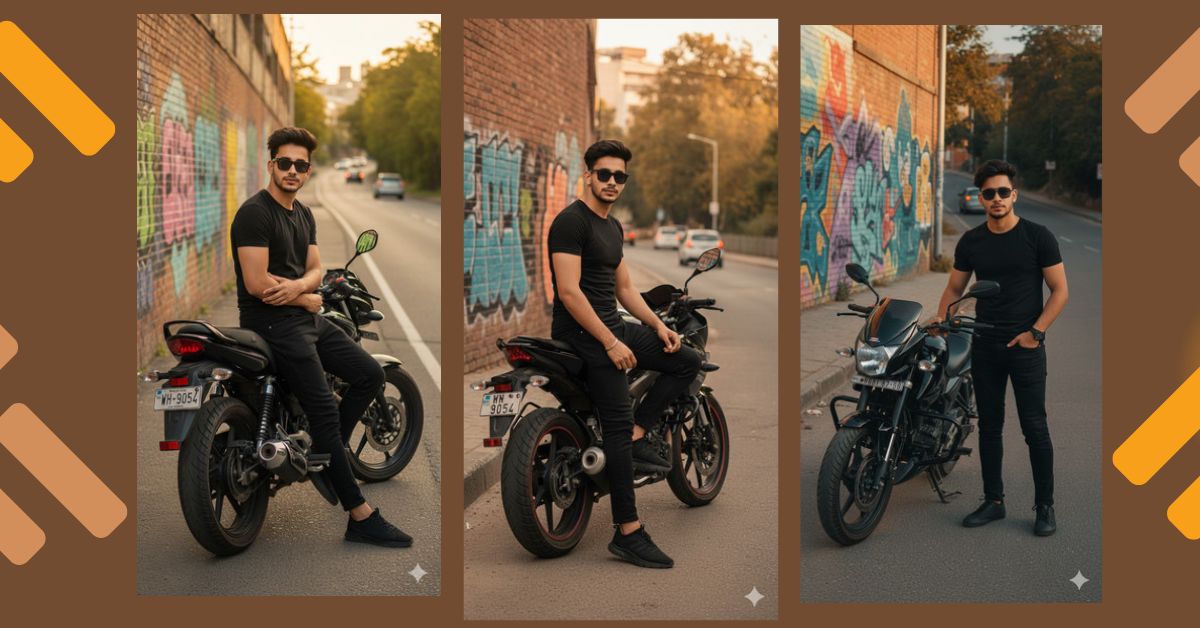
Cinematic street-style AI portraits with bikes are trending fast on Instagram Reels and social media.
This style looks bold, modern, and powerful, just like a movie scene mixed with street fashion.
Creators love this look because it feels rebellious, stylish, and cinematic.
The best part is that you can create this Viral AI Image for free using Google Gemini, without any camera or photoshoot.
In this Techy Gabru guide, you will learn how to generate a high-quality cinematic bike portrait in 9:16 Instagram Reel size.
The Viral Google Gemini Prompt
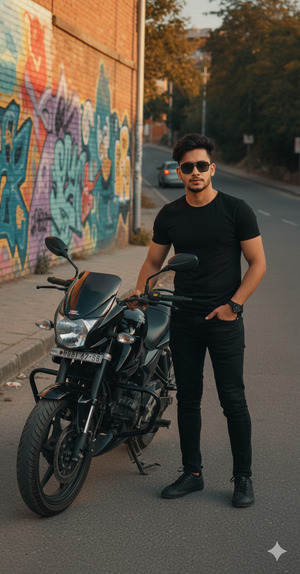
Create a hyper-realistic, ultra-high-quality 8K cinematic portrait based on the uploaded image, keeping the exact same face and hairstyle with maximum likeness. A stylish young man is standing confidently beside a sleek black street motorcycle on an urban roadside during golden hour.
He is wearing an all-black outfit including a fitted black t-shirt, black jeans, black sneakers, and dark sunglasses, giving a bold and modern street fashion look. His posture is relaxed yet confident, enhancing a strong personality vibe.
The motorcycle is detailed and polished with visible license plate, chrome accents, and realistic textures. Behind him, a vibrant graffiti-covered wall adds an edgy and artistic urban background. The road curves gently, with blurred cars and trees in the distance to create motion and depth.
Lighting is warm and dramatic, casting soft natural shadows and enhancing textures. Cinematic composition, shallow depth of field, realistic skin texture, dynamic contrast, professional urban color grading. No text, no watermark.
Create the image in 9:16 aspect ratio (Instagram Reel size).
Pose Variant 1 – One Foot on the Bike
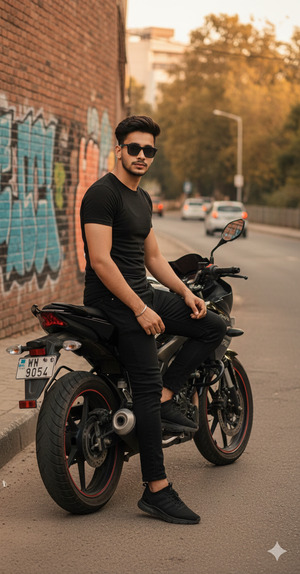
Create a hyper-realistic, ultra-high-quality 8K cinematic portrait based on the uploaded image, keeping the exact same face and hairstyle with maximum likeness. A stylish young man is standing beside a sleek black street motorcycle on an urban roadside during golden hour.
He is wearing an all-black outfit including a fitted black t-shirt, black jeans, black sneakers, and dark sunglasses. He stands confidently with one foot resting on the motorcycle’s footpeg, one hand placed casually on the handlebar, and the other hand relaxed by his side.
The motorcycle is polished with visible license plate and chrome accents. Behind him, a vibrant graffiti-covered wall adds an edgy urban backdrop. The road curves gently with blurred cars and trees in the distance.
Warm cinematic lighting, soft shadows, shallow depth of field, realistic skin texture, dynamic contrast, professional urban color grading. No text, no watermark.
Create the image in 9:16 aspect ratio.
Pose Variant 2 – Leaning Against the Bike
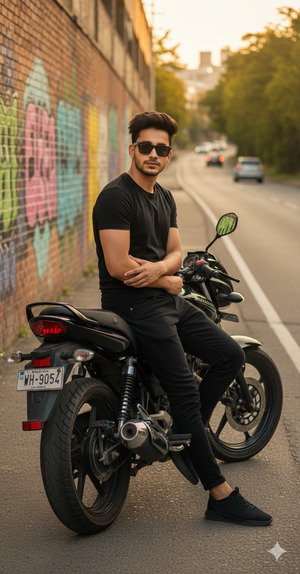
Create a hyper-realistic, ultra-high-quality 8K cinematic portrait based on the uploaded image, keeping the exact same face and hairstyle with maximum likeness. A stylish young man is leaning casually against a sleek black street motorcycle on an urban roadside during golden hour.
He is wearing an all-black outfit including a fitted black t-shirt, black jeans, black sneakers, and dark sunglasses. His arms are relaxed, with one elbow resting lightly on the bike seat while his body leans slightly toward the motorcycle, creating a calm and confident street-style pose.
The motorcycle features visible license plate, chrome details, and polished textures. The background includes a colorful graffiti wall and a gently curving road with blurred cars and trees.
Cinematic golden-hour lighting, soft shadows, shallow depth of field, ultra-realistic skin texture, dynamic contrast, urban cinematic color grading. No text, no watermark.
Create the image in 9:16 aspect ratio.
How to Customize This Prompt
You can easily adjust this prompt to match your style:
- Change outfit color (all-black, grey, leather jacket, hoodie)
- Replace street motorcycle with sports bike or cafe racer
- Modify background (clean street, highway, parking lot)
- Adjust mood (calm, aggressive, stylish, mysterious)
Always keep cinematic lighting and realism for viral results.
How to Create This Image Using Google Gemini
Follow these simple steps:
- Open Google Gemini
- Paste the prompt given above
- Type “Create an image in 9:16 ratio” with the prompt
- Generate and download the image
Your cinematic AI bike portrait is now ready.
Conclusion
This cinematic street bike AI image is perfect for Instagram Reels, profile photos, biker pages, and fashion content.
The golden-hour lighting, urban graffiti background, and bold outfit make it highly eye-catching and viral.
Create your image using Google Gemini, post it on Instagram, and show your street-style attitude to the world.
Don’t forget to tag Techy Gabru and inspire others with your AI creativity.







