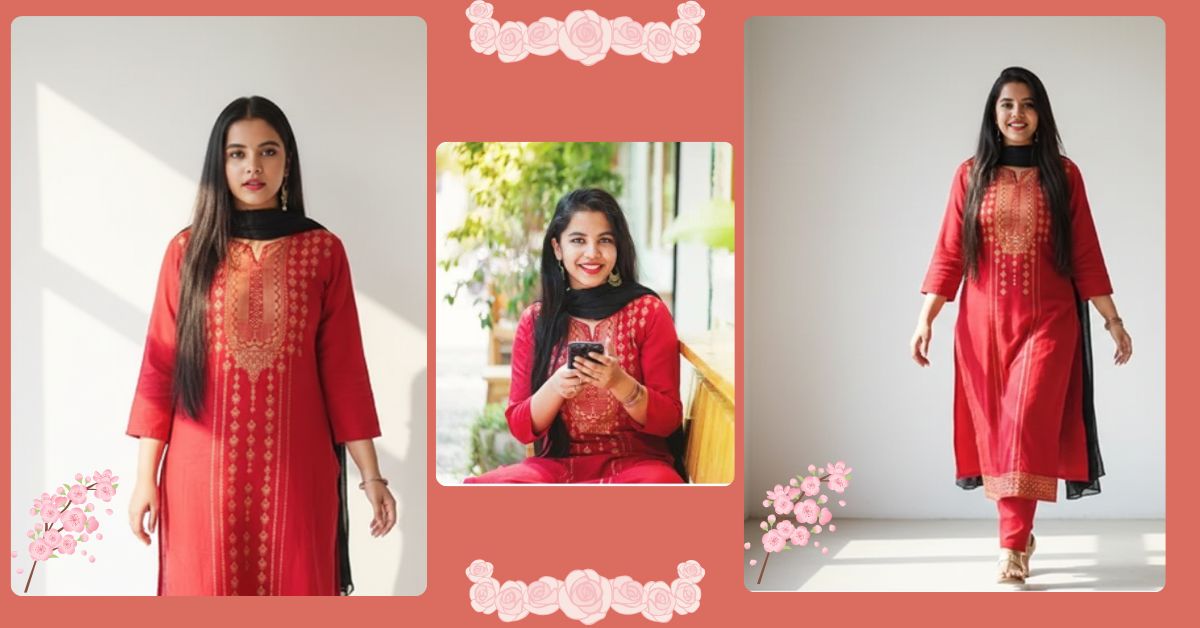
Outfit swap AI images are trending massively on Instagram Reels right now. People love seeing realistic transformations where the face stays natural but the outfit looks professionally changed, just like a real photoshoot.
This style looks premium, clean, and influencer-ready. The best part is that you can create this Viral AI Image for free using Google Gemini, without editing skills or paid tools.
The Viral Prompt
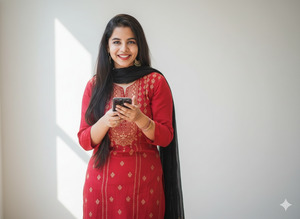
Create an ultra realistic high-quality photo by placing the outfit from reference image 2 onto the woman in reference image 1, without changing or modifying her facial features, face shape, skin tone, or expression in any way. The face must remain exactly the same as the original image. The final image should look completely natural and realistic, not edited or artificial. The woman is standing inside a minimal room with a clean white background, posing elegantly. Soft afternoon sunlight enters the room, creating a bright, warm, and natural lighting effect with gentle shadows. Hairstyle features long, straight, shiny, smooth dark brown hair parted down the middle with butterfly layers. She is wearing the exact clothes provided in the second image with realistic fabric texture, accurate fit, and natural folds. Professional fashion photography, ultra realistic textures, cinematic lighting, HDR quality, realistic depth of field, vibrant yet natural colors, ultra sharp focus, premium look, high quality, 8k resolution. Create image in 9:16 aspect ratio.
Pose Variant 1 – Standing Elegantly (Hands Relaxed)
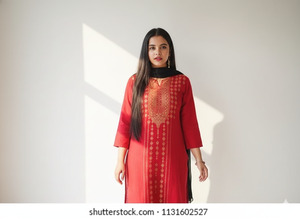
Create an ultra realistic high-quality photo by placing the outfit from reference image 2 onto the woman in reference image 1, without changing or modifying her facial features, face shape, skin tone, or expression in any way. The face must remain exactly the same as the original image. The final image should look completely natural and realistic, not edited or artificial. The woman is standing inside a minimal room with a clean white background, posing elegantly with both hands relaxed naturally by her sides, shoulders soft, posture graceful. Soft afternoon sunlight enters the room, creating a bright, warm, and natural lighting effect with gentle shadows. Hairstyle features long, straight, shiny, smooth dark brown hair parted down the middle with butterfly layers. She is wearing the exact clothes provided in the second image with realistic fabric texture, accurate fit, and natural folds. Professional fashion photography, ultra realistic textures, cinematic lighting, HDR quality, realistic depth of field, vibrant yet natural colors, ultra sharp focus, premium look, high quality, 8k resolution. Create image in 9:16 aspect ratio.
Pose Variant 2 – Hand on Waist (Confident Model Pose)
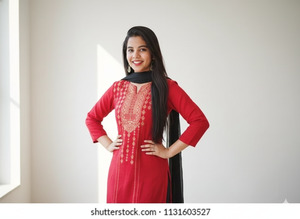
Create an ultra realistic high-quality photo by placing the outfit from reference image 2 onto the woman in reference image 1, without changing or modifying her facial features, face shape, skin tone, or expression in any way. The face must remain exactly the same as the original image. The final image should look completely natural and realistic, not edited or artificial. The woman is standing inside a minimal room with a clean white background, posing elegantly with one hand placed gently on her waist and the other arm relaxed, body slightly angled like a fashion model. Soft afternoon sunlight enters the room, creating a bright, warm, and natural lighting effect with gentle shadows. Hairstyle features long, straight, shiny, smooth dark brown hair parted down the middle with butterfly layers. She is wearing the exact clothes provided in the second image with realistic fabric texture, accurate fit, and natural folds. Professional fashion photography, ultra realistic textures, cinematic lighting, HDR quality, realistic depth of field, vibrant yet natural colors, ultra sharp focus, premium look, high quality, 8k resolution. Create image in 9:16 aspect ratio.
Pose Variant 3 – Walking Pose (Mid-Step Natural Look)
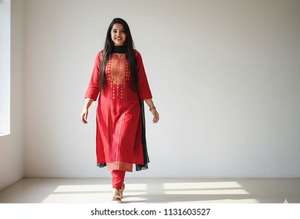
Create an ultra realistic high-quality photo by placing the outfit from reference image 2 onto the woman in reference image 1, without changing or modifying her facial features, face shape, skin tone, or expression in any way. The face must remain exactly the same as the original image. The final image should look completely natural and realistic, not edited or artificial. The woman is inside a minimal room with a clean white background, captured in a natural mid-walk pose with one foot slightly forward and arms moving softly, giving a candid fashion photoshoot feel. Soft afternoon sunlight enters the room, creating a bright, warm, and natural lighting effect with gentle shadows. Hairstyle features long, straight, shiny, smooth dark brown hair parted down the middle with butterfly layers. She is wearing the exact clothes provided in the second image with realistic fabric texture, accurate fit, and natural folds. Professional fashion photography, ultra realistic textures, cinematic lighting, HDR quality, realistic depth of field, vibrant yet natural colors, ultra sharp focus, premium look, high quality, 8k resolution. Create image in 9:16 aspect ratio.
How to Customize This Prompt
You can easily personalize this Google Gemini Prompt:
- Replace room background (white room) with any indoor setting
- Change time of light (morning / golden hour) if needed
- Modify hair color or length if you want a different look
- Upload your own face image so Gemini keeps your facial features exactly the same
Do not change the core structure for the most realistic result.
How to Create This Image Using Google Gemini
Follow these simple 4 steps:
- Open Google Gemini on your mobile or desktop
- Upload Image 1 (your face) and Image 2 (outfit reference)
- Paste the prompt and add: “Create an image in 9:16 aspect ratio”
- Generate the image and download it in high quality
Your Instagram Reel–ready AI photo is now complete
Conclusion
This Trending Outfit Swap AI Image style is perfect for Instagram Reels, profile photos, fashion content, and personal branding. The clean white background, natural sunlight, and realistic outfit replacement give a professional photoshoot feel.
Create your image using Google Gemini, share it on Instagram, and watch the engagement grow. Don’t forget to tag Techy Gabru for more viral AI image prompts and trends.
Start creating today and upgrade your Instagram game







