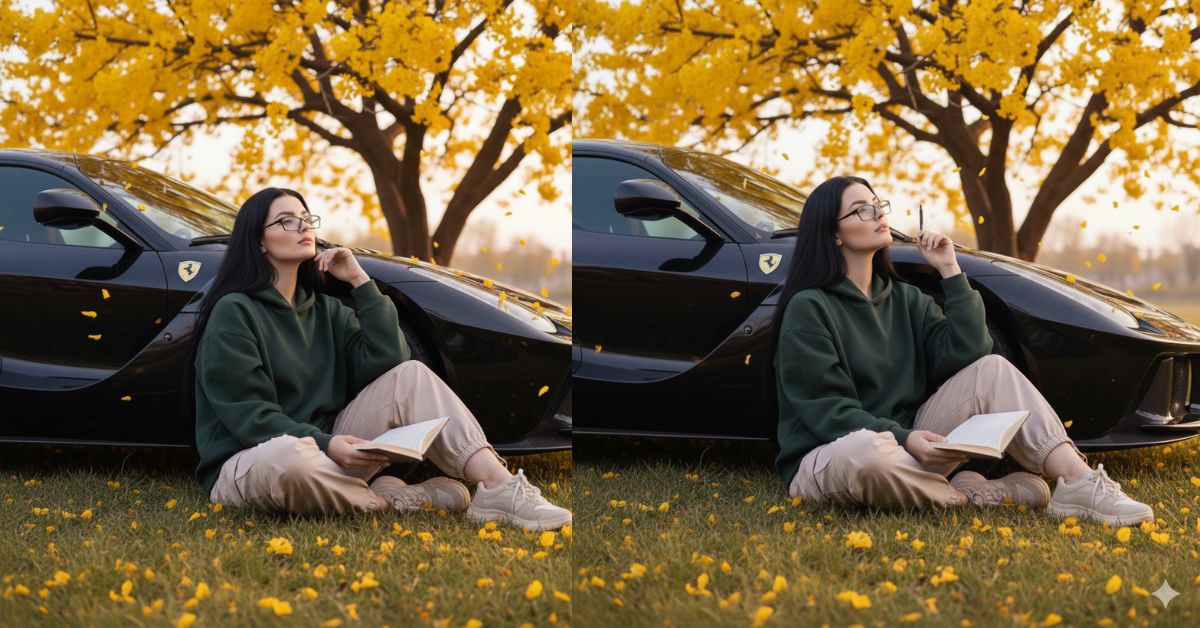
Cinematic moody lifestyle portraits with nature, luxury cars, and soft lighting are trending on Instagram and Reels.
This style feels calm, thoughtful, and high-fashion, which makes it perfect for aesthetic and storytelling content.
You can create this Viral AI Image for free using Google Gemini.
Just use one perfect prompt and always select 9:16 Aspect Ratio (Instagram Reel size) for the best reach.
The Viral Prompt (Google Gemini Prompt)
Use the uploaded reference image and match the woman’s face exactly with 100% accuracy. Do not change facial features, face shape, skin tone, or identity in any way.
Create an ultra-realistic, cinematic lifestyle portrait of a young woman sitting quietly in a grass-covered field. She has dark black hair and wears thin rectangular glasses. Her expression is calm and thoughtful.
Scene & Pose: She is sitting under a large tree filled with vibrant yellow flowers, leaning gently against an elegant black LaFerrari. She is holding an open notebook in her hands while looking pensively upward, as if lost in deep thought.
Outfit & Style: She is wearing an oversized dark green hoodie, loose beige cargo pants, and thick casual sneakers, creating a relaxed yet stylish aesthetic.
Environment & Mood: Yellow flower petals are scattered across the grass and floating softly in the air. The background feels peaceful and artistic, blending nature with luxury.
Lighting & Camera: Soft golden-lavender cinematic lighting, natural highlights, gentle shadows, professional DSLR photography look, shallow depth of field.
Quality & Look: Ultra-realistic details, realistic skin texture, sharp focus, high quality, 8K resolution, cinematic storytelling style.
IMPORTANT: Create the image in 9:16 aspect ratio (Instagram Reel size).
Negative Prompt:
face change, identity change, cartoon, anime, illustration, painting, unrealistic skin, blur, noise, watermark, logo, text, extra fingers, bad anatomy, low quality, overexposed, underexposed
Pose Variant 1 – Notebook-on-Knees Thoughtful Pose
Scene & Pose: She is sitting on the grass with her knees slightly drawn up, the open notebook resting gently on her knees. One hand lightly holds the notebook while the other hand rests near her leg. She leans back softly against the black LaFerrari and looks upward with a calm, thoughtful expression.
Pose Variant 2 – Side Lean Writing Pose

Scene & Pose: She is sitting sideways on the grass, leaning her shoulder against the black LaFerrari. The open notebook rests on her lap as she lightly holds a pen, as if pausing mid-thought. Her head is tilted slightly upward, eyes looking into the distance with a reflective, cinematic mood.
How to Customize This Prompt
You can personalize the image easily by changing a few details:
- Change hoodie color (dark green → black, brown, or grey)
- Change pants style (cargo → wide jeans)
- Change notebook (notebook → book or sketchpad)
- Change flower color (yellow → pink or white)
Always keep the line “match the face exactly” to protect identity.
How to Create This Image Using Google Gemini
Follow these simple 4 steps:
- Open Google Gemini on your mobile or desktop.
- Upload your reference image and paste the Viral Prompt above.
- Type clearly at the end: “Create an image in 9:16 aspect ratio”
- Generate the image and download it for Instagram Reels.
Conclusion
This Viral AI Cinematic Nature Image is perfect for Instagram Reels, aesthetic profiles, and storytelling content.
The mix of luxury car, calm pose, floating petals, and cinematic lighting creates a powerful emotional vibe.
With Google Gemini, you can turn a simple idea into a high-end cinematic portrait without a photoshoot.
Always use 9:16 ratio, focus on mood, and keep textures realistic.
Once your image is ready, share it on Instagram with calm or cinematic music and let the visuals speak.
Keep creating unique AI visuals with Techy Gabru







