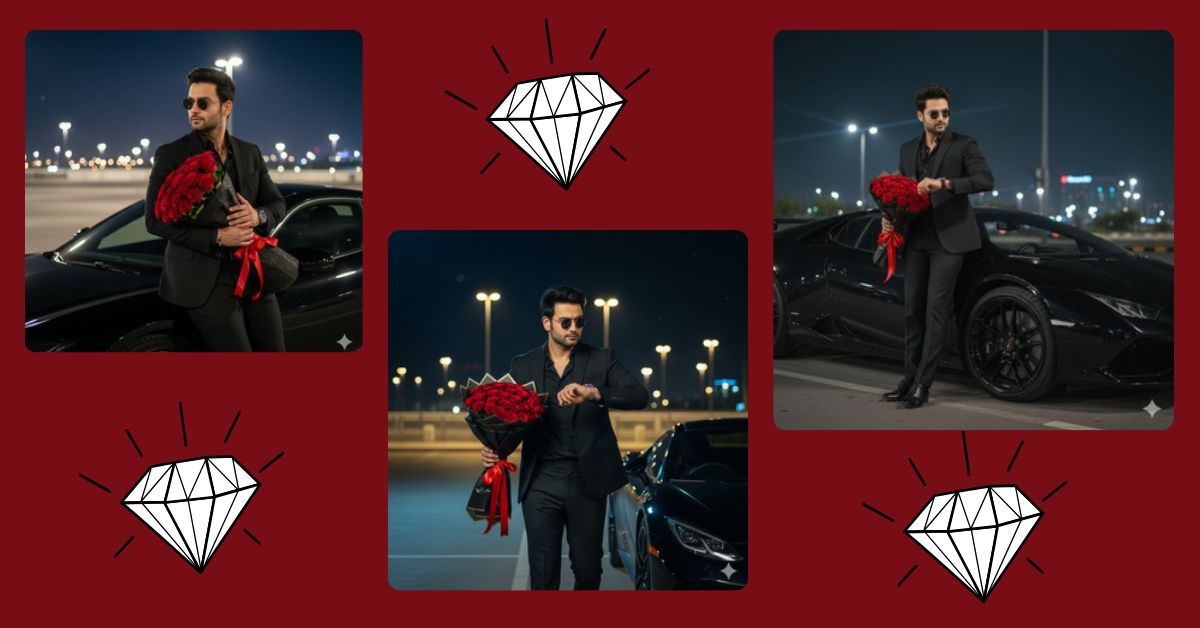
Cinematic luxury portraits are trending hard on Instagram Reels and social media right now.
People love images that look like movie scenes—classy, mysterious, romantic, and powerful.
The best part?
You can create this Viral AI Image for FREE using Google Gemini, without any design skills.
In this blog, Techy Gabru brings you one perfect Google Gemini prompt to generate a high-quality cinematic portrait that looks straight out of a movie scene.
The Viral Prompt (Google Gemini)

Create a hyper-realistic cinematic portrait in 9:16 aspect ratio, based on the uploaded reference image, keeping the same face structure and hairstyle. A stylish young man is standing confidently in a modern city parking lot at night beside a sleek black luxury car. He is wearing a perfectly fitted black suit with a black shirt and black trousers, accessorized with a premium luxury wristwatch and dark sunglasses. In one hand, he is holding a bouquet of fresh red roses wrapped in elegant black paper with a red ribbon, while checking his wristwatch with the other hand, as if waiting for someone special. The background shows glowing city lights, blurred bokeh street lamps, a deep night sky with faint stars, and subtle reflections on the car. Cinematic lighting, dramatic shadows, romantic and mysterious mood, luxurious and classy vibe, ultra-detailed, realistic skin texture, sharp focus, high quality, 8K resolution, professional photography, shallow depth of field.
Pose Variant 1: Walking While Looking at Watch (Powerful & Boss Vibe)

Create a hyper-realistic cinematic portrait in 9:16 aspect ratio, based on the uploaded reference image, keeping the same face structure and hairstyle. A stylish young man is confidently walking forward in a modern city parking lot at night beside a sleek black luxury car. He is wearing a perfectly fitted black suit with a black shirt and black trousers, accessorized with a premium luxury wristwatch and dark sunglasses. He is holding a bouquet of fresh red roses wrapped in elegant black paper with a red ribbon in one hand, while slightly lifting his other hand to check his wristwatch mid-walk, showing confidence and authority. The background shows glowing city lights, blurred bokeh street lamps, a deep night sky with faint stars, and subtle reflections on the car. Cinematic lighting, dramatic shadows, romantic and mysterious mood, luxurious and classy vibe, ultra-detailed, realistic skin texture, sharp focus, high quality, 8K resolution, professional photography, shallow depth of field.
Pose Variant 2: Leaning Against the Car (Cool & Romantic Mood)

Create a hyper-realistic cinematic portrait in 9:16 aspect ratio, based on the uploaded reference image, keeping the same face structure and hairstyle. A stylish young man is leaning casually against a sleek black luxury car in a modern city parking lot at night. He is wearing a perfectly fitted black suit with a black shirt and black trousers, accessorized with a premium luxury wristwatch and dark sunglasses. He is holding a bouquet of fresh red roses wrapped in elegant black paper with a red ribbon in one hand, while the other hand rests relaxed near his watch, giving a calm and romantic waiting pose. The background shows glowing city lights, blurred bokeh street lamps, a deep night sky with faint stars, and subtle reflections on the car. Cinematic lighting, dramatic shadows, romantic and mysterious mood, luxurious and classy vibe, ultra-detailed, realistic skin texture, sharp focus, high quality, 8K resolution, professional photography, shallow depth of field.
How to Customize This Prompt
You can easily personalize this prompt to match your style:
- Replace black suit with any color you like
- Change red roses to another flower
- Modify luxury car to sports car or classic car
- Adjust the mood (romantic, powerful, boss-like, calm)
Just edit those words before pasting the prompt into Google Gemini.
How to Create This Image Using Google Gemini
Follow these simple 4 steps to generate your viral image:
- Open Google Gemini on your mobile or desktop
- Upload your photo (clear face photo works best)
- Paste the prompt above and type:
“Create an image in 9:16 aspect ratio” - Generate and download your cinematic AI image
That’s it! Your Instagram Reel–ready image is ready.
Conclusion
This Viral AI Image trend is perfect for Instagram Reels, profile pictures, and luxury-style posts.
With Google Gemini Prompt, you can create stunning cinematic images that look professional, stylish, and eye-catching.
Try this prompt today, post your creation on Instagram, and don’t forget to tag Techy Gabru.
Stay creative, stay trending, and keep experimenting with AI magic!







