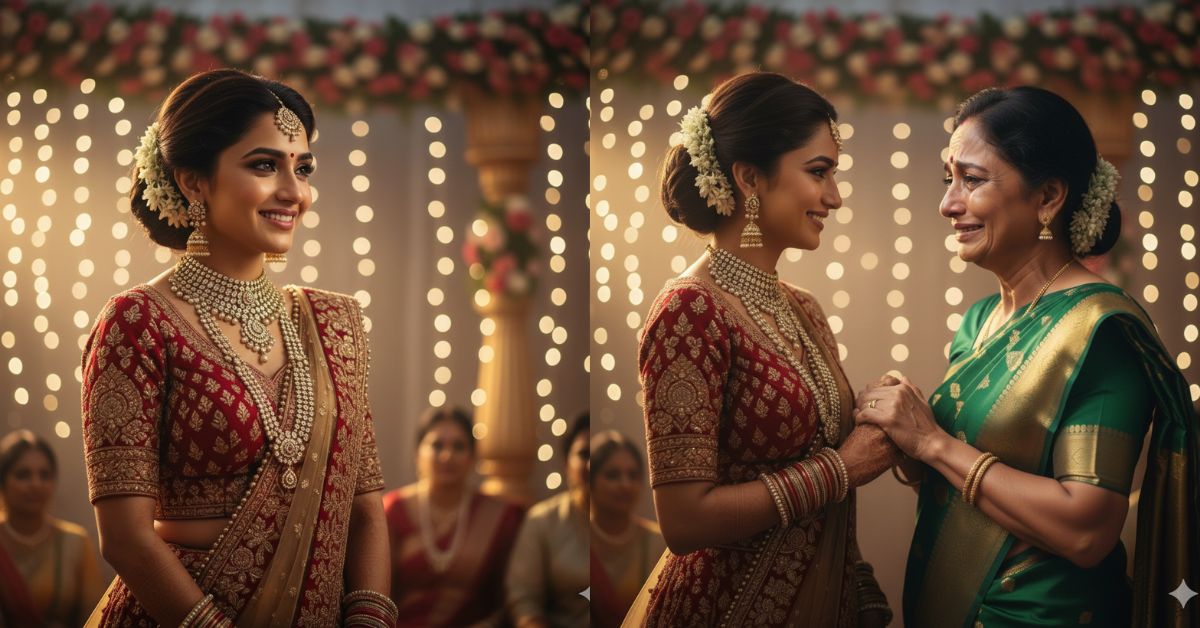
Emotional wedding moments are trending heavily on Instagram and Reels right now.
People are moving away from posed photos and loving raw, real emotions captured in one powerful frame.
Especially moments showing a mother’s tears, blessings, and silent prayers are touching millions of hearts.
The best part?
You can recreate this viral emotional wedding image for free using Google Gemini, with a single detailed prompt and a 9:16 Instagram Reel size image.
The Viral Prompt (Google Gemini)

Create an ultra-realistic, cinematic emotional wedding portrait capturing a raw, unplanned moment during a wedding ceremony. A mother stands slightly apart from the crowd, eyes filled with tears, hands gently clasped, her expression reflecting deep love, pride, memories, and silent prayers. Her tears are not of sorrow but of overwhelming emotion as she blesses her child in her heart. The background shows a softly blurred wedding setting with warm lights, subtle smiles, and muted celebration tones. Natural cinematic lighting highlights the moisture in her eyes and the texture of her skin. The atmosphere feels deeply human, honest, and emotional. High quality, 8K resolution, realistic skin texture, cinematic depth of field, soft bokeh background, natural color grading, professional photography style. Create the image in 9:16 aspect ratio.
Pose Variant 1 – Gentle Embrace (Emotional & Intimate)

The mother stands slightly to the side, gently holding the bride’s face with both hands, foreheads almost touching. Her eyes are moist, lips softly pressed together, capturing a quiet moment of love and blessing.
Pose Variant 2 – Hands Clasped, Tears Falling (Raw & Honest)

The mother faces the bride directly, holding both of her hands tightly at chest level. Tears roll down her cheeks as she smiles through emotion, body leaning forward slightly in a heartfelt pause.
How to Customize This Prompt
You can easily personalize this prompt:
- Replace “mother” with father, parents, or family elder
- Adjust lighting mood (golden hour, indoor warm lights, candlelight)
- Change setting (temple wedding, outdoor mandap, church, home ceremony)
Do not change the emotional core if you want viral results.
How to Create This Image Using Google Gemini
Follow these simple steps:
- Open Google Gemini
- Paste the full prompt given above
- Add this line at the end:
“Create an image in 9:16 ratio” - Generate and download your image
That’s it. No paid tools required.
Conclusion
Some wedding moments are louder than music and deeper than words.
A mother’s tears, silent prayers, and unspoken blessings carry years of love, sacrifice, and strength.
These are the moments people feel instantly because they are real.
Create your emotional wedding image using Google Gemini and share it proudly on Instagram.
Let your post remind the world that weddings are not just about couples, but about families, emotions, and stories written through time.







