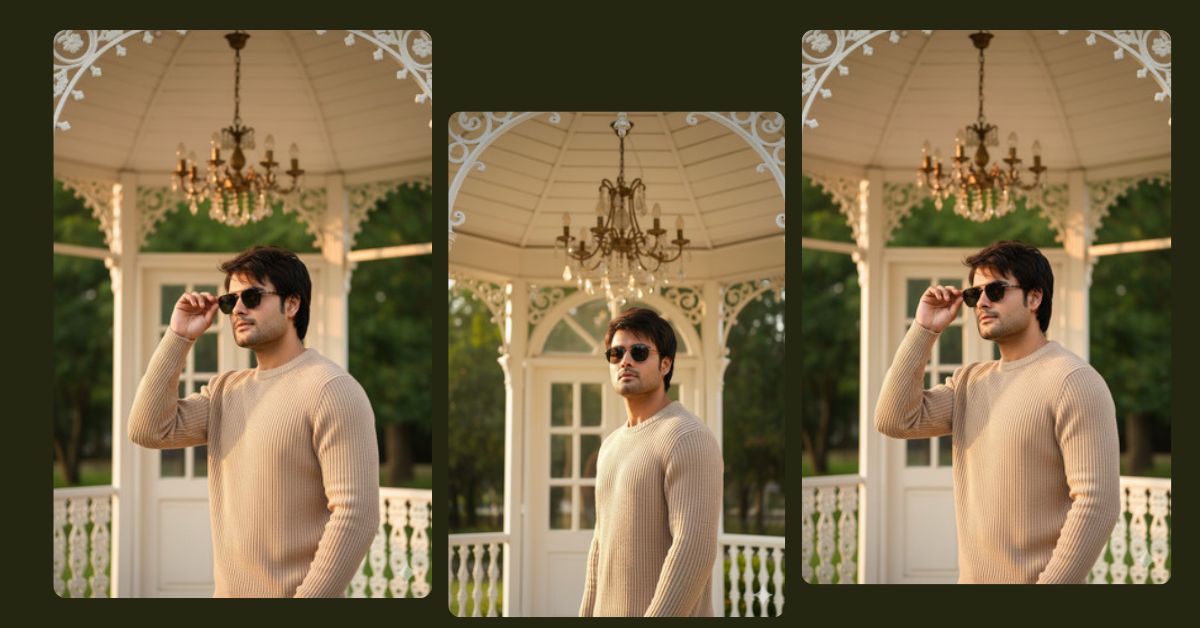
This elegant gazebo portrait style is trending on Instagram Reels right now.
Creators love it because it looks cinematic, royal, and very aesthetic in vertical format.
The best part?
You can create this Viral AI Image for free using Google Gemini, without any editing skills.
You only need one perfect prompt and the right image ratio.
In this blog, I will give you a high-quality Google Gemini prompt that helps you generate this exact trending look.
The Viral Prompt (Google Gemini Prompt)

Create a hyper-realistic cinematic portrait of a young man with the same facial features, hairstyle, and mustache as shown in the reference image. He is wearing a thick beige ribbed knit sweater and stylish dark sunglasses. The man is standing inside a decorative white Victorian-style gazebo during golden hour. Warm sunlight softly illuminates his face as he looks slightly upward, creating golden highlights on his sweater and the gazebo structure. The gazebo features intricate white metal railings, cream-colored walls, and a classic paneled door behind him. A vintage bronze chandelier with crystal details hangs from the ceiling, casting elegant soft shadows. Trees and greenery appear in the background with a smooth depth-of-field blur. Ultra-detailed, realistic skin texture, sharp focus, cinematic lighting, professional photography, high quality, 8K resolution, natural colors, Instagram reel style. Create the image in 9:16 aspect ratio.
Pose Variant 1: One Hand Adjusting Sunglasses (Stylish Pose)

Create a hyper-realistic cinematic portrait of a young man with the same facial features, hairstyle, and mustache as shown in the reference image. He is wearing a thick beige ribbed knit sweater and stylish dark sunglasses. The man is standing inside a decorative white Victorian-style gazebo during golden hour, gently lifting one hand to adjust his sunglasses while the other hand rests naturally by his side. His head is slightly tilted upward, giving a stylish and confident expression. Warm sunlight softly illuminates his face, creating golden highlights on his sweater and the gazebo structure. The gazebo features intricate white metal railings, cream-colored walls, and a classic paneled door behind him. A vintage bronze chandelier with crystal details hangs from the ceiling, casting elegant soft shadows. Trees and greenery appear in the background with a smooth depth-of-field blur. Ultra-detailed, realistic skin texture, sharp focus, cinematic lighting, professional photography, high quality, 8K resolution, natural colors, Instagram reel style. Create the image in 9:16 aspect ratio.
How to Customize This Prompt
You can easily personalize this prompt to match your style.
- Replace clothing color (beige sweater) with your favorite color
- Change sunglasses to glasses or remove them
- Modify facial expression (smiling, serious, confident)
- Adjust background time (sunset, morning light)
Just edit the sentence you want—no need to change the whole prompt.
How to Create This Image Using Google Gemini
Follow these simple 4 steps:
Step 1
Open Google Gemini on your mobile or desktop.
Step 2
Paste the viral prompt given above.
Step 3
Add this line at the end if needed:
“Create an image in 9:16 aspect ratio” (Instagram Reel size).
Step 4
Generate and download your AI image.
Now it’s ready to post on Instagram Reels.
Conclusion
This Google Gemini Prompt helps you create a trending viral AI image that looks premium, cinematic, and Instagram-ready.
If you want more likes, saves, and shares, this gazebo portrait style is perfect.
Post your image as a Reel, add soft music, and watch the engagement grow.
Don’t forget to share your creation on Instagram and tag @sukoonprompt for more viral AI prompt ideas!







