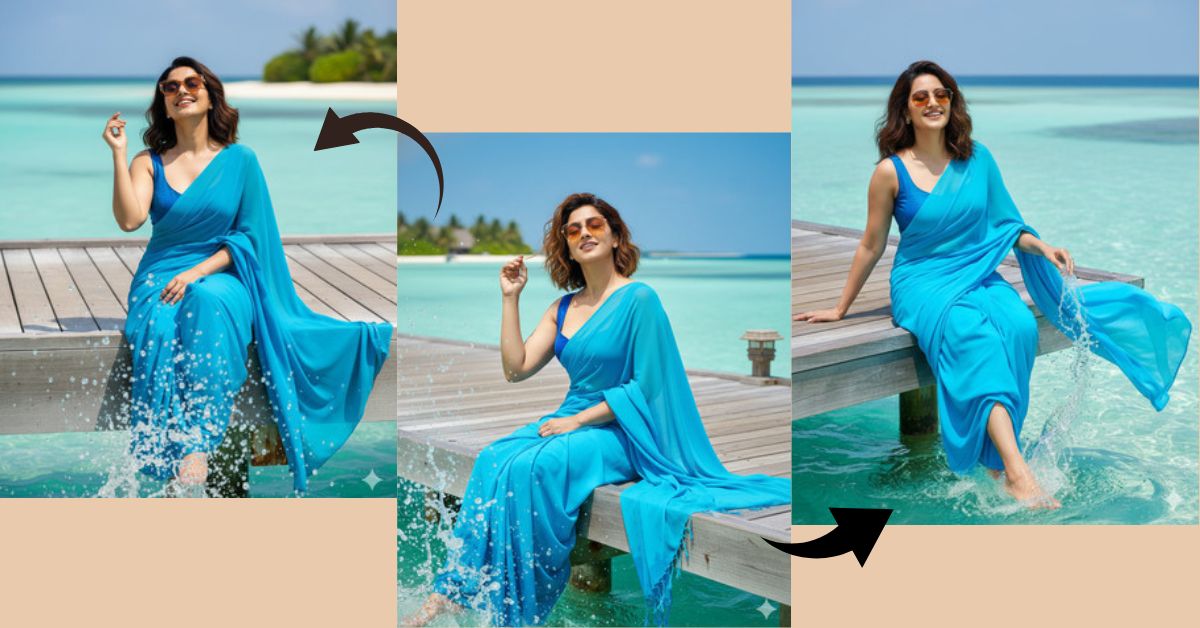
Beach saree portraits with Maldives-style turquoise water and relaxed luxury vibes are trending hugely on Instagram Reels.
People love images that show freedom, elegance, sunshine, and vacation mood, especially when traditional fashion meets tropical locations.
This style looks cinematic, premium, and perfect for reels and profile posts.
The good news is—you can create this Viral AI Image for FREE using Google Gemini, without traveling to the Maldives or doing any editing.
The Viral Prompt (Google Gemini Prompt)
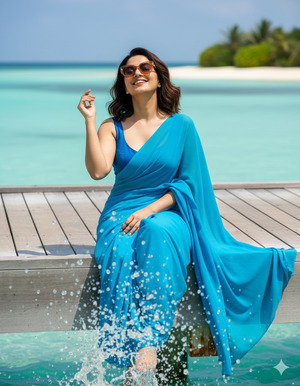
Create a high-quality, ultra-realistic cinematic portrait using the uploaded face image exactly as it is, with 100% no change to facial features, skin tone, or expressions. The person is sitting on a wooden pier in the Maldives, with legs playfully splashing the clear turquoise sea, creating sparkling sunlight reflections on the water for a lively and dynamic effect.
The pose is relaxed and joyful: one hand is gently near the hair, the head is slightly tilted back while taking a sun bath, eyes closed with a natural smile on the face. The person is wearing a vibrant bright sky-blue elegant plain chiffon saree paired with a sleeveless dark sky-blue blouse. Hair is medium-length with a slight natural wave.
Amber-tinted Prada sunglasses are worn, adding a luxury vacation vibe. The background features crystal-clear ocean water, bright tropical sunlight, and a peaceful Maldives atmosphere.
Use cinematic natural lighting, realistic skin texture, detailed fabric flow, water splash realism, soft shadows, shallow depth of field, professional DSLR photography style, ultra-detailed environment, high quality, stunning 8K resolution.
Create the image in 9:16 aspect ratio.
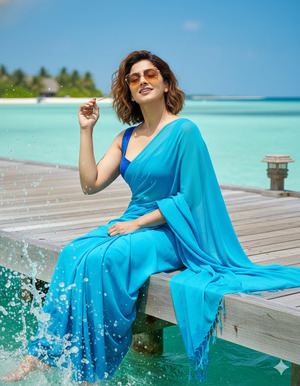
Pose Variant 1 – Hands Behind Body Relax Pose
<!– wp:code –>
<pre class=”wp-block-code”><code>Create a high-quality, ultra-realistic cinematic portrait using the uploaded face image exactly as it is, with 100% no change to facial features, skin tone, or expressions. The person is sitting on a wooden pier in the Maldives, with legs playfully splashing the clear turquoise sea, creating sparkling sunlight reflections on the water for a lively and dynamic effect.
The pose is relaxed and joyful: one hand is gently near the hair, the head is slightly tilted back while taking a sun bath, eyes closed with a natural smile on the face. The person is wearing a vibrant bright sky-blue elegant plain chiffon saree paired with a sleeveless dark sky-blue blouse. Hair is medium-length with a slight natural wave.
Amber-tinted Prada sunglasses are worn, adding a luxury vacation vibe. The background features crystal-clear ocean water, bright tropical sunlight, and a peaceful Maldives atmosphere.
Use cinematic natural lighting, realistic skin texture, detailed fabric flow, water splash realism, soft shadows, shallow depth of field, professional DSLR photography style, ultra-detailed environment, high quality, stunning 8K resolution.
Create the image in 9:16 aspect ratio.
</code></pre>
<!– /wp:code –>
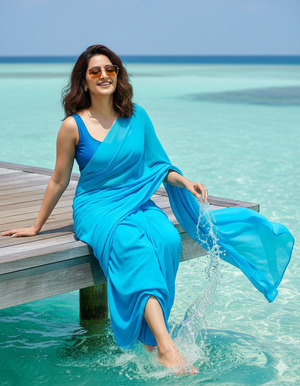
Pose Variant 2 – One Hand on Pier, One Hand in Water Pose
<!– wp:code –>
<pre class=”wp-block-code”><code>Create a high-quality, ultra-realistic cinematic portrait using the uploaded face image exactly as it is, with no changes at all. The person is sitting on a wooden pier in the Maldives, with one leg lightly splashing the turquoise sea while the other leg hangs relaxed, creating a playful water ripple effect.
The pose is joyful and candid: one hand rests on the wooden pier beside the body, while the other hand gently touches the sea water. The head is slightly tilted to one side, eyes closed with a natural smile, enjoying the sun. The person wears a bright sky-blue chiffon saree and sleeveless dark sky-blue blouse, with softly wavy medium-length hair.
Amber-tinted Prada sunglasses add a luxury vacation vibe. The background features sparkling sea water and tropical sunlight.
Use cinematic lighting, realistic skin texture, detailed fabric movement, water splash realism, shallow depth of field, professional DSLR photography style, ultra-detailed, stunning 8K resolution.
Create the image in 9:16 aspect ratio.</code></pre>
<!– /wp:code –>
How to Customize This Prompt
You can easily personalize this viral AI image:
- Change saree color (white, peach, lavender, emerald)
- Modify blouse design (halter neck, backless, short sleeves)
- Adjust sunglasses style (round, oversized, gold frame)
- Upload your own face image (face remains unchanged)
- Change pier type (wooden dock, beach edge, overwater villa)
Just replace the words inside the prompt—simple and beginner-friendly.
How to Create This Image Using Google Gemini
Follow these easy steps
Step 1
Open Google Gemini on your mobile or laptop.
Step 2
Paste the Google Gemini Prompt given above.
Step 3
Type this line along with the prompt:
Create an image in 9:16 aspect ratio (Instagram Reel size)
Step 4
Click generate, wait a few seconds, and download your AI image.
Your Trending Viral AI Image is now ready.
Conclusion
This Maldives pier saree AI image style is perfect for Instagram Reels, travel aesthetics, luxury lifestyle content, and elegant profile photos.
It shows happiness, calmness, elegance, and vacation energy—exactly what goes viral on social media today.
Create your image using Google Gemini, post it on Instagram, and let your followers feel the sunshine and tropical vibes.
For more Trending Viral AI Image Google Gemini Prompts, keep visiting Techy Gabru and keep creating







